
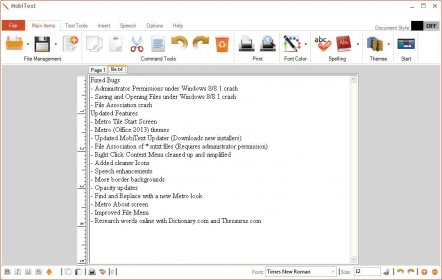
MobiText is a nice word editor. This application is a combination between two well-known programs: Microsoft Office Word 2010 and WordPad. I am saying that because its interface has a casual menu as WordPad, but it provides more options to help you edit your text. It is not as complex as Microsoft Office Word 2010, but it is good enough to improve your text quality.
You can find the most useful items in the main window. You can use them for the basic commands like copy/paste, undo/redo, delete, print and so on. In addition, on the same page you may find an option to set the font color, a spell checker, and a list of themes for MobiText. I consider interesting the fact that the font controls are placed at the foot of the page so as not to clutter the top view. Text Tool section allows you to edit your text. Here you find options for changing the appearance of the text: font tools, formatting tools, zoom percent, and paragraph bullets. The insert option lets you import images. I shall point out that only Bitmap, JPEG, and GIF files are supported. In the same section you can choose to insert the time and date.
What's more, Sub/Super Script tools are available for editing scientific texts. A great thing about this application should be the Speech field, but any command in this area generates an exception. This exception is the result of an empty string in the programming code. The Options menu includes Hide/Show Rulers buttons, means to set the opacity, and a background theme list.
As for me, this is a good application, with a nice and easy-to-use interface, but with a not very elaborate menu structure. It is a good word editor. The Speech field should be the special part of this application, but the error I received makes me look for alternatives.






Comments (3)
I don't know what the other commenter is talking about. I have Windows 8 and this app works fine. Yes, the installer has a problem with Windows 8 where it won't auto-open after the installation, but DyNiForm even tells you that during the install process. Loading the app from the Start Screen works fine after the install finishes. This also begs the question as the whether Brian had .NET 4.
Honestly though I had an amazing experience with this app. One of my new favorite ones! I'm using Windows 8 on a 2012 HP PC! I also installed it on Bootcamp on my new MacBook with Windows 7, it works well there too.